

Normalized Steam API JSON
Use predictable JSON structures across documented inventory, item, profile, float and price endpoints.
Steam API for CS2, Rust, Dota 2 & more — leading inventory, profile, market, pricing & trade APIs.
















Numbers from our production platform, updated continuously.
Start using Steamwebapi in three steps: create your account, get your Steamwebapi API key and call a documented endpoint.
Sign in with Steam and start on the free plan. No credit card required.
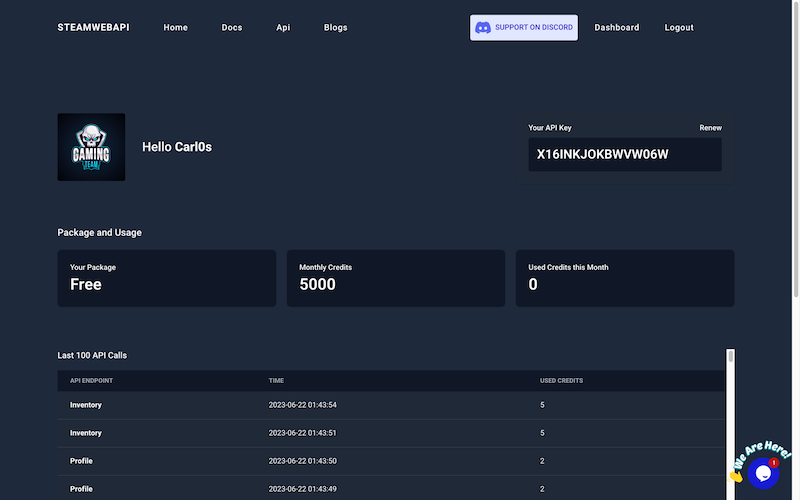
Generate the key in your Steamwebapi dashboard and use it with every documented request.
Fetch inventory, market price, profile or CS2 data through a consistent authenticated JSON interface.
Steamwebapi provides normalized inventory, market, profile and CS2 data through one documented API
View Steam API documentation →Turn Steam inventory, item, profile and marketplace data into products your users can rely on.
Build deposits, item catalogs and pricing workflows with the Steam Inventory API and normalized item data.
Match public inventories with current Steam Market prices to calculate estimated portfolio value.
Add CS2 inventories, Steam profile data and item details to esports platforms, PUG services and community websites.
Build trading workflows, portfolio views and market comparison tools with normalized Steam item prices and historical data.
Create Discord bots that display Steam inventories, item prices, player profiles, rankings and market alerts.
Detect Steam inventory changes and combine them with item metadata, price history and market analytics.
Fetch supported inventories, item metadata, profiles, float data and price history through documented JSON endpoints with rate-limit protection.
Access user inventories including item details — without 429 errors.
The full catalogue of game items with names, types and descriptions.
Steam profile fields: avatar, level, country and friend count.
Per-item price, median price, lowest sell and 24h volume.
Monitor inventory additions and removals in near real time.
Up to 365 days of Steam Market price history per item.
Compare Steam Market and CS2 skin prices from Buff163, Youpin898, Skinport, DMarket, Waxpeer, Skinbaron and other supported marketplaces through one normalized API—including available Doppler phase prices.
Choose an endpoint and inspect a static example JSON response. No signup or API key required.
Review representative response structures before writing integration code. These mock responses demonstrate the normalized JSON format used by documented Steamwebapi endpoints.
Preview the response structure for Steam inventories across CS2, Dota 2, Rust and TF2, including normalized item metadata and available pricing fields.
Pull multiple Steam inventories in a single request. Ideal for portfolio trackers, leaderboards and inventory worth calculators.
Browse the full catalog of Steam items with names, types, rarity, exterior and live market price snapshots.
Get granular per-item data — current price, median price, lowest sell, highest buy and 24h volume — for any Steam Market listing.
Preview Steam profile fields including avatar, level, country, friend count and visibility.
Retrieve float values, paint seeds and patterns for CS2 skins. Backed by our growing float database with 6+ months of historical data.
Get a Steam user's friend list with relation timestamps. Useful for trade-bot allowlists and community graph analytics.
Up to 365 days of Steam Market price history per item. Power dashboards, alerts, arbitrage detection and trading signals.
Decode and validate Steam Login Secure cookies for server-side trade-bot and authentication flows.
Convert any Steam vanity URL or profile link into a SteamID64 for use with all our endpoints.
Use one API key and predictable JSON across Steam inventory, item, profile, CS2 float, marketplace price and price-history workflows.
Go to Steam API DocumentationUse predictable JSON structures across documented inventory, item, profile, float and price endpoints.
Use the latest available Steam and marketplace price snapshots in your product.
Access CS2 item metadata, float values, paint seeds and pattern details where available.
Track available Steam Market price changes over time with historical data.
Monitor item additions and removals in user inventories for a complete history.
Retrieve available Steam profile fields through a documented JSON response.
Request buffering, caching and fallback strategies reduce exposure to upstream Steam rate limits.
Cached reads and normalized payloads reduce repeated upstream work in common integrations.
Check Steamwebapi availability, review documented JSON endpoints and protect production workflows with API key authentication, HTTPS, caching and rate-limit handling.
Documented endpoint contracts and integrations are maintained as supported data sources evolve.
Request buffering and caching reduce exposure to rate limits where endpoint semantics permit it.
API key authentication and HTTPS protect access to documented production endpoints.
Explore dedicated CS2, Dota 2, Rust and Team Fortress 2 API pages for inventory, item and market data.
View all Steam Games APIs
CS2 API
Dota 2 API
Rust API
Team Fortress 2 API
Explore a CS2 inventory value calculator plus PHP and Python examples for integrating Steamwebapi.

A Next.js example that combines Steam Inventory API data with item prices to estimate CS2 inventory value.

A PHP example for authenticated Steamwebapi requests and normalized JSON responses.

A Python example for authenticated Steamwebapi requests and normalized JSON responses.
Same documented endpoints, same API key on every plan — only the rate limits change.
€0 / month
5 requests / day
Answers about Steam API keys, inventory data, market prices, CS2 floats, rate limits and API documentation.
Steamwebapi is an independent platform providing normalized inventory, market, profile and CS2 data for production integrations.
Configured games include CS2, Dota 2, Rust and Team Fortress 2; current inventory, item, market, profile and related endpoints are listed in the documentation.
Your Steamwebapi API key is created in the dashboard after you sign in with Steam. It authenticates Steamwebapi endpoints and is separate from keys used for Valve or Steam Community services. Steam API Key Guide
Your Steamwebapi key is shown in the dashboard after signing in with Steam. Valve's separate Steamcommunity API key is issued at steamcommunity.com/dev/apikey and is only required for official Valve Web API methods.
It exposes available prices, item metadata, sales fields and price history through documented JSON endpoints, depending on item, game and source coverage.
Frequency depends on source and endpoint; available timestamps let applications evaluate freshness while scheduled collection and caching reduce upstream load.
Yes. Steamwebapi data can support marketplaces, price trackers, Discord bots and Steam trade bot workflows. Review current endpoint coverage, plan limits and terms before production use.
Valve does not publish an official, documented Steam Community Market API. Steamwebapi provides documented market endpoints with normalized JSON, current prices and price history, so you do not have to scrape undocumented Steam pages.
Call the documented inventory endpoint with your key, SteamID and game ID. Public inventories return normalized item data; Steam privacy settings still apply.
Fetch the public inventory, match supported items with a consistent Steam or marketplace price field and sum the resulting estimates.
The CS2 Float API returns float values, paint seeds, patterns and inspection screenshots where available. Supported marketplace endpoints expose separate CSFloat price and listing data according to current coverage.
Steam's public inventory endpoint is undocumented and aggressively rate-limited per IP, so busy applications quickly receive 429 Too Many Requests responses. Steamwebapi buffers, caches and retries these requests to keep inventory data available.
Request buffering, caching, retries and endpoint-specific fallbacks reduce exposure to upstream limits, while clients should still handle documented errors.
A free plan is available for evaluation; the Pricing page contains the current limits, included features and production options.
The Steam API documentation lists endpoints, parameters, authentication and request examples. The homepage response explorer provides static mock JSON examples for reviewing representative response structures.
Status code 429 means Steam is rate-limiting your IP after too many requests. Reduce request frequency, cache responses and spread traffic over time — or fetch Steam data through Steamwebapi, which handles buffering, caching and retries for you. Steam 429 Guide
Still have questions?
 Join our Discord
Steamwebapi is an independent developer platform for Steam-related data. One API key provides documented access to inventories, Steam Market prices, item metadata, profiles, CS2 float values, friend lists and historical price data across supported games.
Steamwebapi is not affiliated with Valve. Request buffering, caching and normalized responses are designed to reduce rate-limit friction and simplify production integrations.
Explore the API
Sign in with Steam to create your API key, test documented endpoints and choose a plan when your project is ready for production.
No credit card required